CS2103/T-AY1718S2
  • Schedule
  • Table of Contents
  • Printer-Friendly(ish)
  • Admin
  • Instructors
  • Announcements
  • Submissions
  • Slack
  • Forum
  • Report Bugs
  • Forum
  • Tutorial Schedule
  • Team IDs
  • Java Coding Standard
  • samplerepo-things
  • Addressbook-level1
  • Addressbook-level2
  • Addressbook-level3
  • Addressbook-level4
  • Projects List
  • Full Schedule of Module Activities

    Our tutorial IDs are different from CORS. Format: W09 means Wednesday 0900 and so on.

    Module Tutorial ID (ID in CORS) Time Venue Tutors (contact details)
    CS2103T (CS) W09 (T1) Wed 0900 COM1-B103 (ALL*) TBD
    CS2103T (CS) W10 (T2) Wed 1000 COM1-B103 (ALL) TBD
    CS2103T (CS) W11 (T3) Wed 1100 COM1-B103 (ALL) TBD
    CS2103T (CS) W13 (T4) Wed 1300 COM1-0201 (SR5) TBD
    CS2103T (CS) W14 (T5) Wed 1400 COM1-0201 (SR5) TBD
    CS2103T (CS) W15 (T6) Wed 1500 COM1-0201 (SR5) TBD
    CS2103T (CEG) T09 (C01) Thu 0900 COM1-B103 (ALL) TBD
    CS2103T (CEG) T10 (C04) Thu 1000 COM1-B103 (ALL) TBD
    CS2103T (CEG) T11 (C03) Thu 1100 COM1-B103 (ALL) TBD
    CS2103 T12 (5) Thu 1200 COM1-B103 (ALL) TBD
    CS2103 T13 (6) Thu 1300 COM1-B103 (ALL) TBD
    CS2103 T14 (4) Thu 1400 COM1-B103 (ALL) TBD
    CS2103T (CEG) T15 (C02) Thu 1500 COM1-0210 (SR10) TBD
    CS2103T (CEG) T16 (C06) Thu 1600 COM1-0201 (SR5) TBD
    CS2103T (CEG) T17 (C05) Thu 1700 COM1-0210 (SR10) TBD
    CS2103 F09 (1) Fri 0900 COM1-B103 (ALL) TBD
    CS2103 F10 (2) Fri 1000 COM1-B103 (ALL) TBD
    CS2103 F11 (3) Fri 1100 COM1-B103 (ALL) TBD

    *ALL: Active Learning Room

    Week 1 [Aug 13] Todo

    Given below are some setting up tasks you can do as you wait for the module to start:

    Getting ready for the module:

    [CS2103 students only] Forming teams

    Delay forming teams until your place in a tutorial is confirmed.

    [Exchange students only] Signing up for tutorial

    Exchange students need to use the ORATUT system to register for the tutorials. You must have received the instructions from UG office on how/when to go about the registration process. If not, please talk to UG office. When we can see your appeal on ORATUT, we can allocate you to the tutorial slot.

    Create a GitHub Account

    Create a personal GitHub account if you don't have one yet.

    1. You are advised to choose a sensible GitHub username as you are likely to use it for years to come in professional contexts.
    2. Strongly recommended: Complete your GitHub profile. In particular,
      • Specify your full name.
      • Upload a suitable profile photo (i.e. a recent photo of your face).

    The GitHub profile is useful for the tutors and classmates to identify you. If you are reluctant to share your info in your long-term GitHub account, you can remove those details after the module is over or create a separate GitHub account just for the module.

    Submit Pre-Module Survey (Compulsory)

    Pre-Module Survey will be available on IVLE Week 1 Monday - Friday 2359 ⏰. We need all of you to submit it because it tells us some important information about you, especially your GitHub ID.

    Join the Slack Channel

    Communication: Keeping a record of communications among your team can help you, and us, in many ways. We encourage you to do at least some of the project communication in written medium (e.g., GitHub Issue Tracker) to practice how to communicate technical things in written form.

    • Instead of the IVLE forum, we encourage you to post your questions/suggestions in this github/nus-cs2103-AY1718S2/forum.
    • Alternatively, you can post in our slack channel https://nus-cs2103-ay1718s2.slack.com. We encourage you all to join the slack channel (you'll need to use an email address ending in @nus.edu.sg, @comp.nus.edu.sg, @u.nus.edu.sg or @u.nus.edu to join this channel).
    • Note that slack is useful for quick chats while issue tracker is useful for longer-running conversations.
    • You are encouraged to use channels with a wider audience (common channel in slack, GitHub issue tracker) for module-related communication as much as possible, rather than private channels such as private slack/FB messages or direct emails. Rationale: more classmates can benefit from the discussions.
    Brush up your Java

    This module requires you to write Java code almost every week, staring from the very first week. If your Java skills are shaky, do brush up your Java programming skills.

    In particular, you may want to have a look at the new Java 8 features such as streams, lambdas, Optionals, that may not have been covered in previous Java modules.


    Given below are some module admin info to read around this time:

    Admin info to read:

    Admin   FAQ: Where is everything? Admin   Project: Overview Admin   Project: The Product Admin   Project: Scope Admin   Text Books Admin   Programming Language Admin   Project: Constraints Admin   Project: Timeline Admin   FAQ: What's different between CS2103 and CS2103T? Admin   FAQ: Why the workload is so high? Admin   FAQ: What are the extra requirements to get an A+?

    Tutorial 1

    Note: We use Tutorial 1 to mean the tutorial in week 1.
    No tutorial in week 1.

    Lecture 1

    This lecture is compulsory to attend.

    Slides: [Part 1][Part 2]

    Week 2 [Aug 20] Outcomes

    SE Intro

    W2.1 Can explain pros and cons of software engineering W2.1a Can explain pros and cons of software engineering

    Software Engineering → Introduction →

    Pros and Cons

    Software Engineering: Software Engineering is the application of a systematic, disciplined, quantifiable approach to the development, operation, and maintenance of software" -- IEEE Standard Glossary of Software Engineering Terminology

    The following description of the Joys of the Programming Craft was taken from Chapter 1 of the famous book The Mythical Man-Month, by Frederick P. Brooks.

    Why is programming fun? What delights may its practitioner expect as his reward?

    First is the sheer joy of making things. As the child delights in his mud pie, so the adult enjoys building things, especially things of his own design. I think this delight must be an image of God's delight in making things, a delight shown in the distinctness and newness of each leaf and each snowflake.

    Second is the pleasure of making things that are useful to other people. Deep within, we want others to use our work and to find it helpful. In this respect the programming system is not essentially different from the child's first clay pencil holder "for Daddy's office."

    Third is the fascination of fashioning complex puzzle-like objects of interlocking moving parts and watching them work in subtle cycles, playing out the consequences of principles built in from the beginning. The programmed computer has all the fascination of the pinball machine or the jukebox mechanism, carried to the ultimate.

    Fourth is the joy of always learning, which springs from the nonrepeating nature of the task. In one way or another the problem is ever new, and its solver learns something: sometimes practical, sometimes theoretical, and sometimes both.

    Finally, there is the delight of working in such a tractable medium. The programmer, like the poet, works only slightly removed from pure thought-stuff. He builds his castles in the air, from air, creating by the exertion of the imagination. Few media of creation are so flexible, so easy to polish and rework, so readily capable of realizing grand conceptual structures....

    Yet the program construct, unlike the poet's words, is real in the sense that it moves and works, producing visible outputs separate from the construct itself. It prints results, draws pictures, produces sounds, moves arms. The magic of myth and legend has come true in our time. One types the correct incantation on a keyboard, and a display screen comes to life, showing things that never were nor could be.

    Programming then is fun because it gratifies creative longings built deep within us and delights sensibilities we have in common with all men.

    Not all is delight, however, and knowing the inherent woes makes it easier to bear them when they appear.

    First, one must perform perfectly. The computer resembles the magic of legend in this respect, too. If one character, one pause, of the incantation is not strictly in proper form, the magic doesn't work. Human beings are not accustomed to being perfect, and few areas of human activity demand it. Adjusting to the requirement for perfection is, I think, the most difficult part of learning to program.

    Next, other people set one's objectives, provide one's resources, and furnish one's information. One rarely controls the circumstances of his work, or even its goal. In management terms, one's authority is not sufficient for his responsibility. It seems that in all fields, however, the jobs where things get done never have formal authority commensurate with responsibility. In practice, actual (as opposed to formal) authority is acquired from the very momentum of accomplishment.

    The dependence upon others has a particular case that is especially painful for the system programmer. He depends upon other people's programs. These are often maldesigned, poorly implemented, incompletely delivered (no source code or test cases), and poorly documented. So he must spend hours studying and fixing things that in an ideal world would be complete, available, and usable.

    The next woe is that designing grand concepts is fun; finding nitty little bugs is just work. With any creative activity come dreary hours of tedious, painstaking labor, and programming is no exception.

    Next, one finds that debugging has a linear convergence, or worse, where one somehow expects a quadratic sort of approach to the end. So testing drags on and on, the last difficult bugs taking more time to find than the first.

    The last woe, and sometimes the last straw, is that the product over which one has labored so long appears to be obsolete upon (or before) completion. Already colleagues and competitors are in hot pursuit of new and better ideas. Already the displacement of one's thought-child is not only conceived, but scheduled.

    This always seems worse than it really is. The new and better product is generally not available when one completes his own; it is only talked about. It, too, will require months of development. The real tiger is never a match for the paper one, unless actual use is wanted. Then the virtues of reality have a satisfaction all their own.

    Of course the technological base on which one builds is always advancing. As soon as one freezes a design, it becomes obsolete in terms of its concepts. But implementation of real products demands phasing and quantizing. The obsolescence of an implementation must be measured against other existing implementations, not against unrealized concepts. The challenge and the mission are to find real solutions to real problems on actual schedules with available resources.

    This then is programming, both a tar pit in which many efforts have floundered and a creative activity with joys and woes all its own. For many, the joys far outweigh the woes....

    [Text and book cover source: Wikipedia]

    [Fred Brooks photo source]

    The Mythical Man-Month: Essays on Software Engineering is a book on software engineering and project management by Fred Brooks, whose central theme is that "adding manpower to a late software project makes it later". This idea is known as Brooks's law, and is presented along with the second-system effect and advocacy of prototyping.

    Compare Software Engineering with Civil Engineering in terms of how work products in CE (i.e. buildings) differ from those of SE (i.e. software).

    Buildings Software
    Visible, tangible Invisible, intangible
    Wears out over time Does not wear out
    Change is limited by physical restrictions (e.g. difficult to remove a floor from a high rise building) Change is not limited by such restrictions. Just change the code and recompile.
    Creating an exact copy of a building is impossible. Creating a near copy is almost as costly as creating the original. Any number of exact copies can be made with near zero cost.
    Difficult to move. Easily delivered from one place to another.
    Many low-skilled workers following tried-and-tested procedures. No low-skilled workers involved. Workers have more freedom to follow their own procedures.
    Easier to assure quality (just follow accepted procedure). Not easy to assure quality.
    Majority of the work force has to be on location. Can be built by people who are not even in the same country.
    Raw materials are costly, costly equipment required. Almost free raw materials and relatively cheap equipment.
    Once construction is started, it is hard to do drastic changes to the design. Building process is very flexible. Drastic design changes can be done, although costly
    A lot of manual and menial labor involved. Most work involves highly-skilled labor.
    Generally robust. E.g. removing a single brick is unlikely to destroy a building. More fragile than buildings. A single misplaced semicolon can render the whole system useless.

    Comment on this statement: Building software is cheaper and easier than building bridges (all we need is a PC!).

    Depends on the size of the software. Manpower required for software is very costly. On the other hand, we can create a very valuable software (e.g. an iPhone application that can make million dollars in a month) with a just a PC and a few days of work!

    Justify this statement: Coding is still a ‘design’ activity, not a ‘manufacturing’ activity. You may use a comparison (or an analogy) of Software engineering versus Civil Engineering to argue this point.

    Arguments to support this statement:

    • If coding is a manufacturing activity, we should be able to do it using robotic machines (just like in the car industry) or low-skilled laborers (like in the construction industry).
    • If coding is a manufacturing activity, we wouldn’t be changing it so much after we code software. But if the code is in fact a ‘design’, yes, we would fiddle with it until we get it right.
    • Manufacturing is the process of building a finished product based on the design. Code is the design. Manufacturing is what is done by the compiler (fully automated).

    However, the type of ‘design’ that occurs during coding is at a much lower level than the ‘design’ that occurs before coding.

    List some (at least three each) pros and cons of Software Engineering compared to other traditional Engineering careers.

    • a. Need for perfection when developing software
    • b. Requiring some amount of tedious, painstaking labor
    • c. Ease of copying and transporting software makes it difficult to keep track of versions
    • d. High dependence on others
    • e. Seemingly never ending effort required for testing and debugging software
    • f. Fast moving industry making our work obsolete quickly

    (c)

    Evidence:

    To be able answer questions such as these:

    List some (at least three each) pros and cons of Software Engineering compared to other traditional Engineering careers.

    Implementation

    W2.2 Can use basic features of an IDE W2.2a Can explain IDEs

    Implementation → IDEs →

    What

    Professional software engineers often write code using Integrated Development Environments (IDEs). IDEs support all development-related work within the same tool.

    An IDE generally consists of:

    • A source code editor that includes features such as syntax coloring, auto-completion, easy code navigation, error highlighting, and code-snippet generation.
    • A compiler and/or an interpreter (together with other build automation support) that facilitates the compilation/linking/running/deployment of a program.
    • A debugger that allows the developer to execute the program one step at a time to observe the run-time behavior in order to locate bugs.
    • Other tools that aid various aspects of coding e.g. support for automated testing, drag-and-drop construction of UI components, version management support, simulation of the target runtime platform, and modeling support.

    Examples of popular IDEs:

    • Java: Eclipse, Intellij IDEA, NetBeans
    • C#, C++: Visual Studio
    • Swift: XCode
    • Python: PyCharm

    Some Web-based IDEs have appeared in recent times too e.g., Amazon's Cloud9 IDE.

    Some experienced developers, in particular those with a UNIX background, prefer lightweight yet powerful text editors with scripting capabilities (e.g. Emacs) over heavier IDEs.

    • a. Compiling.
    • b. Syntax error highlighting.
    • c. Debugging.
    • d. Code navigation e.g., to navigate from a method call to the method implementation.
    • e. Simulation e.g., run a mobile app in a simulator.
    • f. Code analysis e.g. to find unreachable code.
    • g. Reverse engineering design/documentation e.g. generate diagrams from code
    • h. Visual programming e.g. Write programs using ‘drag and drop’ actions instead of typing code.
    • i. Syntax assistance e.g., show hints as you type.
    • j. Code generation e.g., to generate the code required by simply specifying which component/structure you want to implement.
    • k. Extension. i.e. ability add more functionality to the IDE using plugins.

    All.

    Explanation: While all of these features may not be present in some IDEs, most do have these features in some form or other.


    Evidence:

    Install Intellij IDEA on your computer. Either the Community Edition (free) or the Ultimate Edition (free for students) is fine.

    W2.2b Can setup a project in an IDE

    Tools → Intellij IDEA →

    Project Setup

    Running Intellij IDEA for the First Time


    A little bit more detailed explanation (from CodeLaunch) with some additional info at the end.


    Importing a Project to Intellij IDEA

    Evidence:

    Acceptable: Any Java project set up in Intellij.

    Suggested: Do the exercise given in AddressBook - Level1 : LO-IdeSetup

    Submission: Demo the test during the tutorial.

    W2.2c Can navigate code effectively using IDE features

    Tools → Intellij IDEA →

    Code Navigation

    Some useful navigation shortcuts:

    1. Quickly locate a file by name.
    2. Go to the definition of a method from where it is used.
    3. Go back to the previous location.
    4. View the documentation of a method from where the method is being used, without navigating to the method itself.
    5. Find where a method/field is being used.

    Evidence:

    Acceptable: Use Intellij basic code navigation features to navigate the code of any java project.

    Suggested: Do the exercise given in AddressBook - Level1 : LO-CodeNavigation

    Submission: Demo the test during the tutorial.

    W2.3 Can use Java Collections W2.3a Can use Java Collections :

    Evidence:

    Acceptable: Some code that you have written that uses some Java Collection classes.

    Suggested: Do the exercise given in AddressBook - Level1 : LO-Collections

    Submission: Show your code to the tutor during the tutorial.

    W2.4 Can use Java varargs feature W2.4a Can use Java varargs feature :

    Evidence:

    Acceptable: Some code that you have written that uses the varargs feature.

    Suggested: Do the exercise given in AddressBook - Level1 : LO-Varargs

    Submission: Show your code to the tutor during the tutorial.

    Testing

    W2.5 Can automate simple regression testing of text UIs W2.5a Can explain testing

    Quality Assurance → Testing → Introduction →

    What

    Testing: Testing is operating a system or component under specified conditions, observing or recording the results, and making an evaluation of some aspect of the system or component. –- source: IEEE

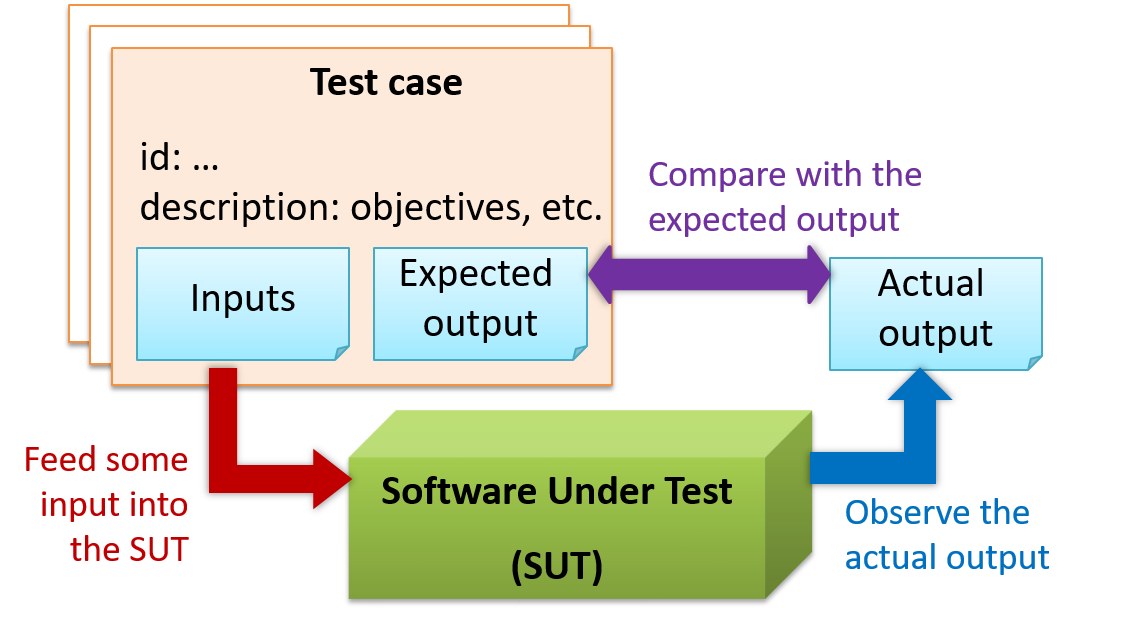
    When testing, we execute a set of test cases. A test case specifies how to perform a test. At a minimum, it specifies the input to the software under test (SUT) and the expected behavior.

    Example: A minimal test case for testing a browser:

    • Input – Start the browser using a blank page (vertical scrollbar disabled). Then, load longfile.html located in the test data folder.
    • Expected behavior – The scrollbar should be automatically enabled upon loading longfile.html.

    Test cases can be determined based on the specification, reviewing similar existing systems, or comparing to the past behavior of the SUT.

    A more elaborate test case can have other details such as those given below.

    • A unique identifier : e.g. TC0034-a
    • A descriptive name: e.g. vertical scrollbar activation for long web pages
    • Objectives: e.g. to check whether the vertical scrollbar is correctly activated when a long web page is loaded to the browser
    • Classification information: e.g. priority - medium, category - UI features
    • Cleanup, if any: e.g. empty the browser cache.

    For each test case we do the following:

    1. Feed the input to the SUT
    2. Observe the actual output
    3. Compare actual output with the expected output

    A test case failure is a mismatch between the expected behavior and the actual behavior. A failure is caused by a defect (or a bug).

    Example: In the browser example above, a test case failure is implied if the scrollbar remains disabled after loading longfile.html. The defect/bug causing that failure could be an uninitialized variable.

    Here is another definition of testing:

    Software testing consists of the dynamic verification that a program provides expected behaviors on a finite set of test cases, suitably selected from the usually infinite execution domain. -– source: Software Engineering Book of Knowledge V3

    Some things to note (indicated by keywords in the above definition):

    • Dynamic: Testing involves executing the software. It is not by examining the code statically.
    • Finite: In most non-trivial cases there are potentially infinite test scenarios but resource constraints dictate that we can test only a finite number of scenarios.
    • Selected: In most cases it is not possible to test all scenarios. That means we need to select what scenarios to test.
    • Expected: Testing requires some knowledge of how the software is expected to behave.

    Explain how the concepts of testing, test case, test failure, and defect are related to each other.


    Evidence:

    Explain how the concepts of testing, test case, test failure, and defect are related to each other.

    W2.5b Can explain regression testing

    Quality Assurance → Testing → Regression Testing →

    What

    When we modify a system, the modification may result in some unintended and undesirable effects on the system. Such an effect is called a regression.

    Regression testing is re-testing the software to detect regressions. Note that to detect regressions, we need to retest all related components, even if they were tested before.

    Regression testing is more effective when it is done frequently, after each small change. However, doing so can be prohibitively expensive if testing is done manually. Hence, regression testing is more practical when it is automated.

    Regression testing is the automated re-testing of a software after it has been modified.

    c.

    Explanation: Regression testing need not be automated but automation is highly recommended.

    Explain why and when you would do regression testing in a software project.


    Evidence:

    Explain why and when you would do regression testing in a software project.

    W2.5c Can explain test automation

    Quality Assurance → Testing → Test Automation →

    What

    An automated test case can be run programmatically and the result of the test case (pass or fail) is determined programmatically. Compared to manual testing, automated testing reduces the effort required to run tests repeatedly and increases precision of testing (because manual testing is susceptible to human errors).


    W2.5d Can semi-automate testing of CLIs

    Quality Assurance → Testing → Test Automation →

    Automated Testing of CLI Apps

    A simple way to semi-automate testing of a CLI(Command Line Interface) app is by using input/output re-direction.

    • First, we feed the app with a sequence of test inputs that is stored in a file while redirecting the output to another file.
    • Next, we compare the actual output file with another file containing the expected output.

    Let us assume we are testing a CLI app called AddressBook. Here are the detailed steps:

    1. Store the test input in the text file input.txt.

      add Valid Name p/12345 valid@email.butNoPrefix
      add Valid Name 12345 e/valid@email.butPhonePrefixMissing
      
    2. Store the output we expect from the SUT in another text file expected.txt.

      Command: || [add Valid Name p/12345 valid@email.butNoPrefix]
      Invalid command format: add 
      
      Command: || [add Valid Name 12345 e/valid@email.butPhonePrefixMissing]
      Invalid command format: add 
      
    3. Run the program as given below, which will redirect the text in input.txt as the input to AddressBook and similarly, will redirect the output of AddressBook to a text file output.txt. Note that this does not require any code changes to AddressBook.

      java AddressBook < input.txt > output.txt
      
      • 💡 The way to run a CLI program differs based on the language.
        e.g., In Python, assuming the code is in AddressBook.py file, use the command
        python AddressBook.py < input.txt > output.txt

      • 💡 If you are using Windows, use a normal command window to run the app, not a Power Shell window.

      A CLI program takes input from the keyboard and outputs to the console. That is because those two are default input and output streams, respectively. But you can change that behavior using < and > operators. For example, if you run AddressBook in a command window, the output will be shown in the console, but if you run it like this,

      java AddressBook > output.txt 
      

      the Operating System then creates a file output.txt and stores the output in that file instead of displaying it in the console. No file I/O coding is required. Similarly, adding < input.txt (or any other filename) makes the OS redirect the contents of the file as input to the program, as if the user typed the content of the file one line at a time.

      📎 Resources:

    4. Next, we compare output.txt with the expected.txt. This can be done using a utility such as Windows FC (i.e. File Compare) command, Unix diff command, or a GUI tool such as WinMerge.

      FC output.txt expected.txt
      

    Note that the above technique is only suitable when testing CLI apps, and only if the exact output can be predetermined. If the output varies from one run to the other (e.g. it contains a time stamp), this technique will not work. In those cases we need more sophisticated ways of automating tests.

    CLI App: An application that has a Command Line Interface. i.e. user interacts with the app by typing in commands.


    Evidence:

    Acceptable: Any project where you use the I/O redirection method to test a CLI.

    Suggested: Do the exercise given in AddressBook - Level1 : LO-AutomatedCliTesting

    Submission: Demo the test during the tutorial.

    Revision Control

    W2.6 Can use Git to save history W2.6a Can explain revision control

    Project Management → Revision Control →

    What

    Revision Control Software (RCS) are the software tools that automate the process of Revision Control i.e. managing revisions of software artifacts.

    Revision control is also known as Version Control Software (VCS), and a few other names. Here, we use the terms revision and version interchangeably.

    Revision control is the process of managing multiple versions of a piece of information. In its simplest form, this is something that many people do by hand: every time you modify a file, save it under a new name that contains a number, each one higher than the number of the preceding version.

    Manually managing multiple versions of even a single file is an error-prone task, though, so software tools to help automate this process have long been available. The earliest automated revision control tools were intended to help a single user to manage revisions of a single file. Over the past few decades, the scope of revision control tools has expanded greatly; they now manage multiple files, and help multiple people to work together. The best modern revision control tools have no problem coping with thousands of people working together on projects that consist of hundreds of thousands of files.

    There are a number of reasons why you or your team might want to use an automated revision control tool for a project. It will track the history and evolution of your project, so you don't have to. For every change, you'll have a log of who made it; why they made it; when they made it; and what the change was.

    When you're working with other people, revision control software makes it easier for you to collaborate. For example, when people more or less simultaneously make potentially incompatible changes, the software will help you to identify and resolve those conflicts.

    It can help you to recover from mistakes. If you make a change that later turns out to be an error, you can revert to an earlier version of one or more files. In fact, a really good revision control tool will even help you to efficiently figure out exactly when a problem was introduced.

    It will help you to work simultaneously on, and manage the drift between, multiple versions of your project. Most of these reasons are equally valid, at least in theory, whether you're working on a project by yourself, or with a hundred other people.

    -- [adapted from bryan-mercurial-guide]


    Mercurial: The Definitive Guide by Bryan O'Sullivan retrieved on 2012/07/11

    Revision Control Software

    In the context of RCS, what is a Revision? Give an example.

    Versions of a piece of information. For example, take a file containing program code. If you modify the code and save the file, you have a new version of that file.

    • a. Help a single user manage revisions of a single file
    • b. Help a developer recover from a incorrect modification to a code file
    • c. Makes it easier for a group of developers to collaborate on a project
    • d. Manage the drift between multiple versions of your project
    • e. Detect when multiple developers make incompatible changes to the same file
    • f. All of them are benefits of RCS

    f

    Suppose You are doing a team project with Tom, Dick, and Harry but those three have not even heard the term RCS. How do you explain RCS to them as briefly as possible, using the project as an example?


    Evidence:

    Be able to answer questions such as these:

    Suppose You are doing a team project with Tom, Dick, and Harry but those three have not even heard the term RCS. How do you explain RCS to them as briefly as possible, using the project as an example?

    W2.6b Can explain repositories

    Project Management → Revision Control →

    Repositories

    Repository (repo for short): The database of the history of a directory being tracked by an RCS software (e.g. Git).

    Suppose you want to apply revision control on files in a directory called ProjectFoo. In that case you need to set up a repo (short for repository) in ProjectFoo directory, which is referred to as the working directory of the repo. The repository is the database where the meta-data about the revision history are stored. For example, Git uses a hidden folder named .git inside the working directory.

    You can have multiple repos in your computer, each repo revision-controlling files of a different working directly, for examples, files of different projects.


    In the context of RCS, what is a repo?


    Evidence:

    Be able to answer questions such as these:

    In the context of RCS, what is a repo?

    W2.6c Can create a local Git repo

    Tools → Git and GitHub →

    Init

    Soon you are going to take your first step in using Git. If you would like to see a quick overview of the full Git landscape before jumping in, watch the video below.

    Install SourceTree which is Git + a GUI for Git.

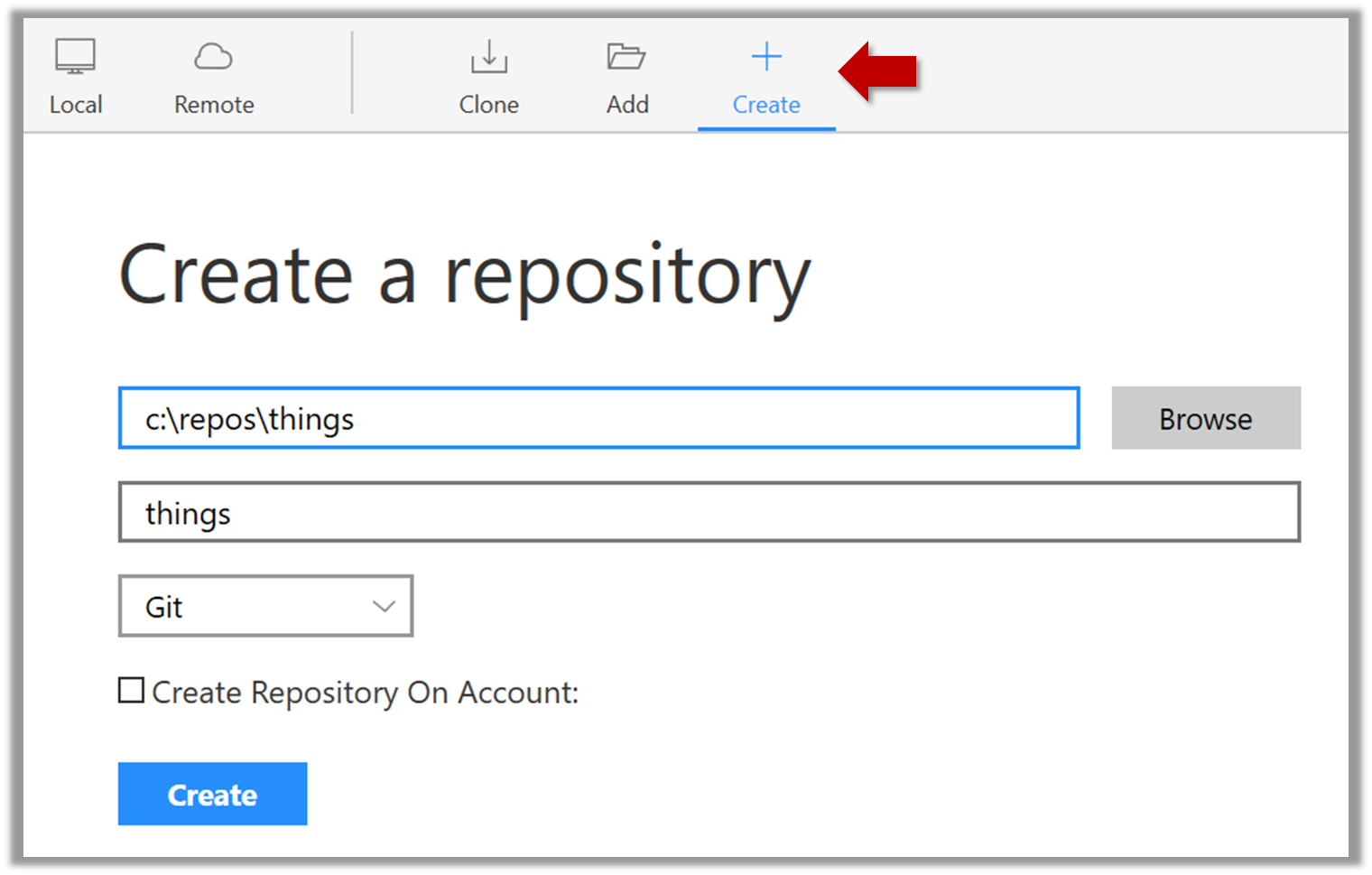
    Suppose you want to create a repository in an empty directory things

    Windows: Click FileClone/New…. Click on Create button.
    Mac: New...Create New Repository.

    Enter the location of the directory (Windows version shown below) and click Create.

    Go to the things folder and observe how a hidden folder .git has been created.

    Note: If you are on Windows, you might have to configure Windows Explorer to show hidden files.


    Open a Git Bash Terminal.

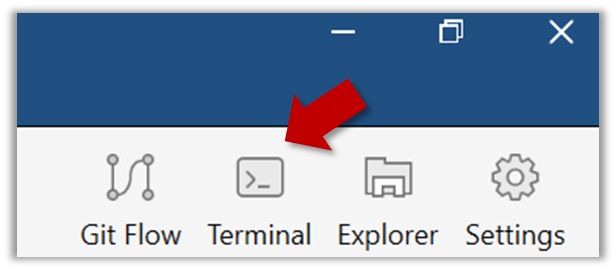
    If you installed SourceTree, you can click the Terminal button to open a GitBash terminal.

    Navigate to the things directory.

    Use the command git init which should initialize the repo.

    $ git init
    Initialized empty Git repository in c:/repos/things/.git/
    

    You can use the command ls -a to view all files, which should show the .git directory that was created by the previous command.

    $ ls -a
    .  ..  .git
    

    You can also use the git status command to check the status of the newly-created repo. It should respond with something like the bellow

    git status
    

    ⤵️

    # On branch master
    #
    # Initial commit
    #
    nothing to commit (create/copy files and use "git add" to track)


    Evidence:

    Have a local repo that you created.

    W2.6d Can explain saving history

    Project Management → Revision Control →

    Saving History

    Tracking and Ignoring

    In a repo, we can specify which files to track and which files to ignore. Some files such a temporary log files created during the build/test process should not be revision-controlled.

    Staging and Committing

    Committing saves a snapshot of the current state of the tracked files in the revision control history. Such a snapshot is also called a commit (i.e. the noun).

    When ready to commit, we first stage the specific changes we want to commit. This intermediate step allows us to commit only some changes while saving other changes for a later commit.


    Identifying Points in History

    Each commit in a repo is a recorded point in the history of the project that is uniquely identified by an auto-generated hash e.g. a16043703f28e5b3dab95915f5c5e5bf4fdc5fc1.

    We can tag a specific commit with a more easily identifiable name e.g. v1.0.2


    Evidence:

    Have a local repo that has commits you created.

    W2.6e Can commit using Git

    Tools → Git and GitHub →

    Commit

    Create an empty repo.

    Create a file named fruits.txt in the working directory and add some dummy text to it.

    Working directory: The directory the repo is based in is called the working directory.

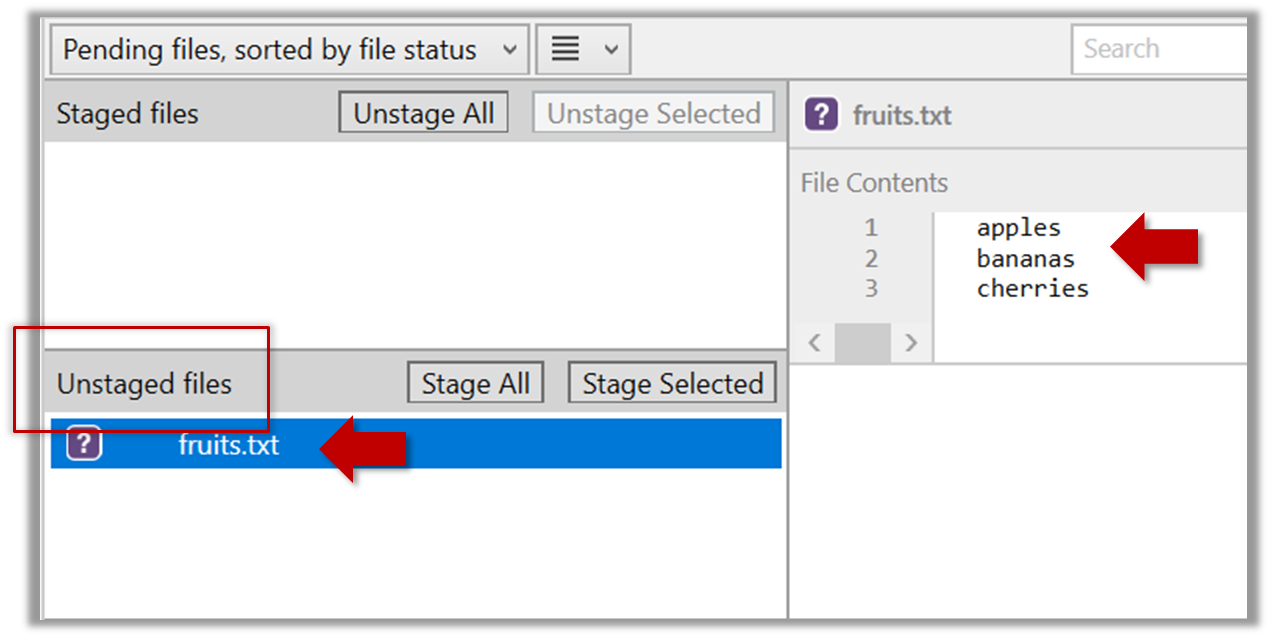
    Observe how the file is detected by Git.

    The file is shown as ‘unstaged’


    You can use the git status command to check the status of the working directory.

    git status
    

    ⤵️

    # On branch master
    #
    # Initial commit
    #
    # Untracked files:
    #   (use "git add <file>..." to include in what will be committed)
    #
    #   a.txt
    nothing added to commit but untracked files present (use "git add" to track)
    

    Although git has detected the file in the working directory, it will not do anything with the file unless you tell it to. Suppose we want to commit the current state of the file. First, we should stage the file.

    Commit: Saving the current state of the working folder into the Git revision history.

    Stage: Instructing Git to prepare a file for committing.

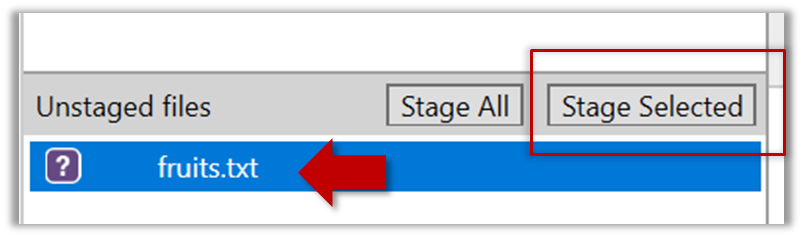
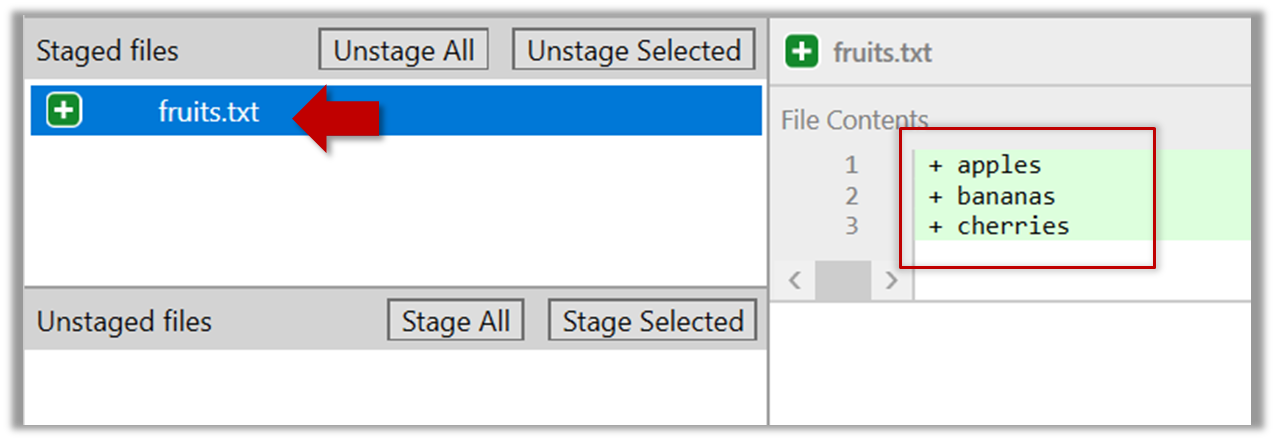
    Select the fruits.txt and click on the Stage Selected button

    fruits.txt should appear in the Staged files panel now.’


    You can use the stage or the add command (they are synonyms, add is the more popular choice) to stage files.

    git add fruits.txt
    git status
    

    ⤵️

    # On branch master
    #
    # Initial commit
    #
    # Changes to be committed:
    #   (use "git rm --cached <file>..." to unstage)
    #
    #       new file:   fruits.txt
    #
    

    Next, we can commit the staged version of fruits.txt

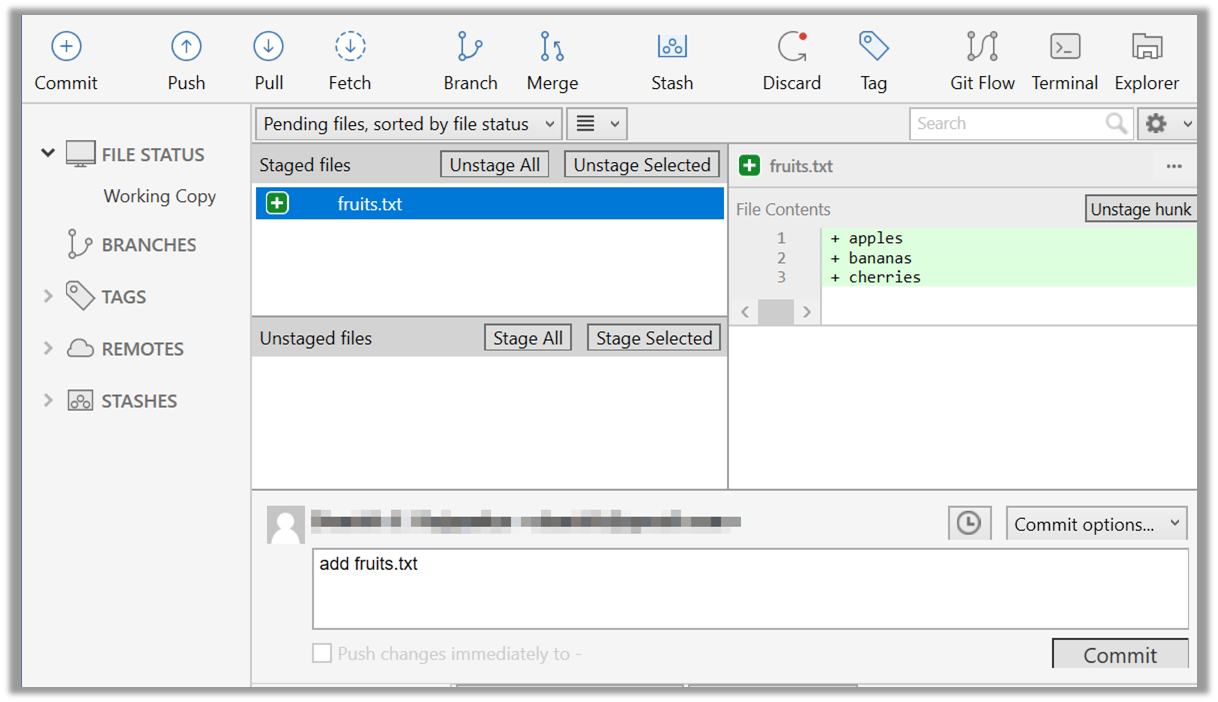
    Click the Commit button, enter a commit message e.g. add fruits.txt in to the text box, and click Commit


    Use the commit command to commit. The -m switch is used to specify the commit message.

    git commit -m "add fruits.txt"
    

    You can use the log command to see the commit history

    git log
    

    ⤵️

    commit 8fd30a6910efb28bb258cd01be93e481caeab846
    Author: … < … @... >
    Date:   Wed Jul 5 16:06:28 2017 +0800
    
      Add fruits.txt
    

    Note the existence of something called the master branch. Git allows you to have multiple branches (i.e. it is a way to evolve the content in parallel) and Git creates a default branch named master on which the commits go on by default.

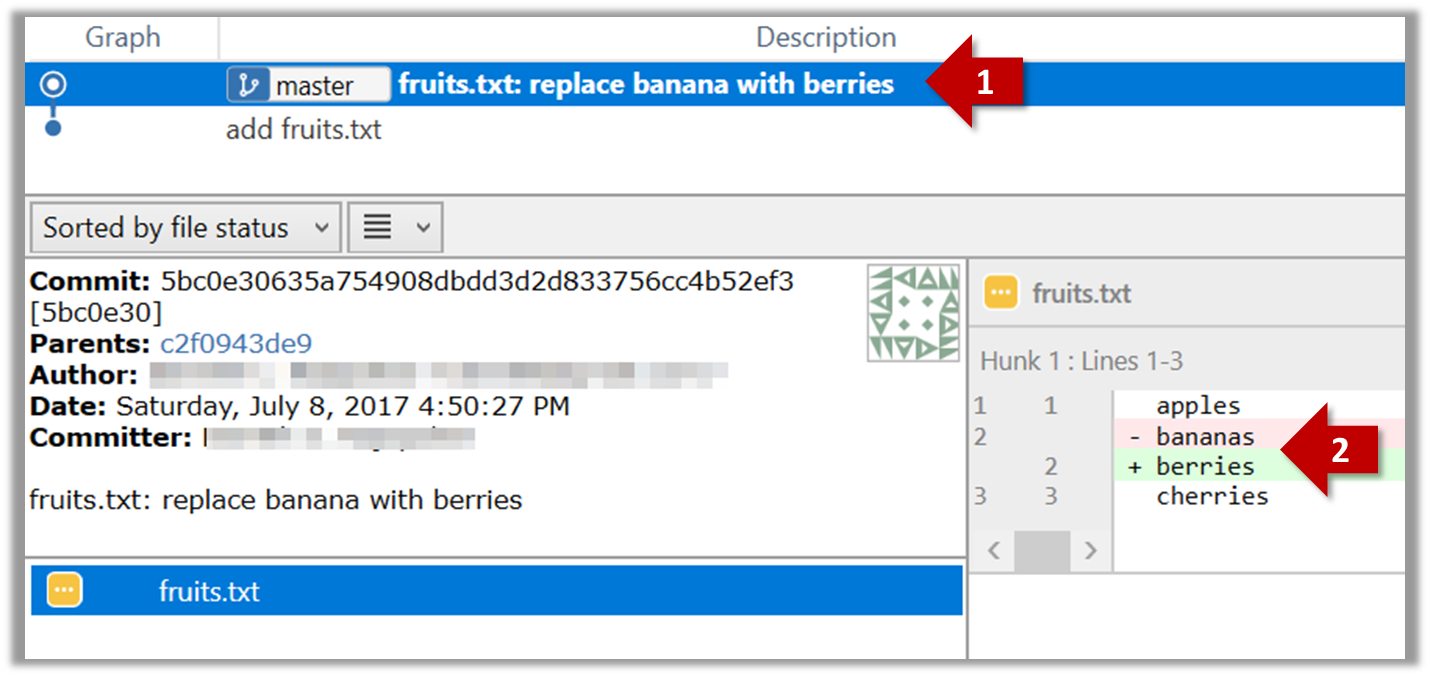
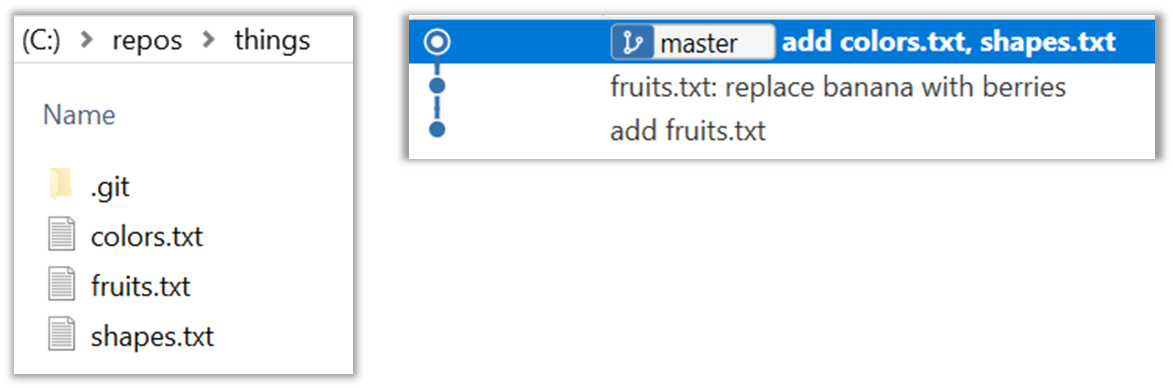
    Do some changes to fruits.txt (e.g. add some text and delete some text). Stage the changes, and commit the changes using the same steps we followed before. You should end up with something like this.

    Next, add two more files colors.txt and shapes.txt to the same working directory. Add a third commit to record the current state of the working directory.

    • Try Git is an online simulation/tutorial of Git basics. You can try its first few steps to solidify what you learned in this LO.
    W2.6f Can set Git to ignore files

    Tools → Git and GitHub →

    Ignore

    Add a file names temp.txt to the things repo you created. Suppose we don’t want this file to be revision controlled by Git. Let’s instruct Git to ignore temp.txt

    The file should be currently listed under Unstaged files. Right-click it and choose Ignore…. Choose Ignore exact filename(s) and click OK.

    Observe that a file named .gitignore has been created in the working directory root and has the following line in it.

    temp.text
    

    Create a file named .gitignore in the working directory root and add the following line in it.

    temp.text
    

    The .gitignore file tells Git which files to ignore when tracking revision history. That file itself can be either revision controlled or ignored.

    • To version control it (the more common choice – which allows you to track how the .gitignore file changed over time), simply commit it as you would commit any other file.
    • To ignore it, follow the same steps we followed above when we set Git to ignore the temp.txt file.

    Evidence:

    Have a local repo that has git-ignored files.

    Todo

    Admin info to read:

    Admin   Policy on Tech Help Admin   Module Tools Admin   Module Principles Admin   FAQ: Why you force me to visit a separate website instead of using IVLE? Admin   FAQ: Why slides are not detailed? Admin   FAQ: Why so much self-study?

    Tutorial 2

    Tutorial selection and seating arrangement

    • CS2103 students: As you don't have a confirmed tutorial yet, attend the slot you chose in the 'Temporary Tutorial Registration' on IVLE. Team forming will be done in the following week. You are free to sit with anyone this week.
    • CS2103T students: Attend the tutorial pre-allocated to you. Sit together with your team members.

    Show evidence of weekly learning outcomes

    • Starting with learning outcomes at level, share/discuss/demo evidence of (as directed by the tutor) weekly learning outcomes.
    Lecture 2

    [slides]

    Week 3 [Aug 27] Week 4 [Sep 3] Week 5 [Sep 10] Week 6 [Sep 17] Week 7 [Oct 1] Week 8 [Oct 8] Week 9 [Oct 15] Week 10 [Oct 22] Week 11 [Oct 29] Week 12 [Nov 5] Week 13 [Nov 12]